Flight Tracker: Live Radar
- 0.0
- Rating
- 10.00K
- Installs
- Free
- Price
 Analysis by App-foxy
I noticed the appeal of Flight Tracker: Live Radar almost immediately: it turns a flight number into something I can follow visually instead of treating travel as a series of airport screens and notification emails. In my first week with it, I used it less as a planning tool and more as a calm way to answer small but important questions: Has the aircraft left yet? Is the arrival still on schedule? Should I head to the airport now, or can I wait?
That makes this free Travel & Local app from GPS soft Labs easy to understand. It focuses on live flight tracking, radar-style movement, flight status, delays, arrivals, departures and alerts. The app is available for everyone, runs on Android 8.0 or later, and its current version is 3.0.5. Its audience is broad, but its real value depends on whether you regularly meet people at airports, travel by air, or need a quicker view of changing flight information.
My honest question after the novelty faded was simple: would I keep opening it after the first interesting radar view? The answer is yes, but only for a particular kind of user. It earns a place on my phone when I have an active journey to monitor or someone to collect. Between trips, it becomes much less essential than a general map, an airline app or the airport’s own information service.
You May Also Like

 Pandora - Music & Podcasts
Pandora’s Music Is Easy to Start, but Harder to Recover
Pandora’s strength is its low-effort path from a seed to a station. Its weak spot is how much confidence it asks you to place in connection, setup, and quiet recovery.

 AccuWeather: Weather Radar
AccuWeather Review: A Quick, Clear Forecast for Everyday Decisions
For everyday plans, the best forecast is the one you can understand quickly. AccuWeather makes rain timing, radar, and local conditions easy to act on, with a few trade-offs.

 Hill Climb Racing
Why Hill Climb Racing Still Turns Crashes Into One More Run
A tiny car, a bumpy hill and one more upgrade: Hill Climb Racing keeps resurfacing because its simple chaos makes every near-miss feel personal.

 AliExpress - Shopping App
AliExpress Makes Global Shopping Feel Personal, but Shoppers Bear the Risk
AliExpress turns a global marketplace into a pocket-sized discovery engine. Its reach is useful, its shopping loop compelling, and its trade-offs easy to miss.

 Lords Mobile: Kingdom Wars
Lords Mobile Is a Kingdom-Building Routine, Not a Quick Match
A case-by-case verdict on the building, battles, device demands, and social commitments that make Lords Mobile rewarding for some players and exhausting for others.

 PDF Scanner app - TapScanner
TapScanner Makes Paperwork Easier to Capture, Check, and Share
TapScanner makes scanning with a phone feel less like a rescue operation and more like a dependable step in getting work done. Its capture tools are useful, though not flawless.
More From Our News Desk
View All News


What the first week feels like in everyday use
The strongest first impression is the combination of a map and practical status information. A plain flight-status page can tell me whether a departure is delayed, but a radar view gives that information a sense of movement. I can look at the aircraft’s position, then switch my attention to the arrival or departure details when I need a more concrete answer.
This is particularly useful when I am waiting for another person. Imagine a friend flying in for the weekend. Instead of repeatedly asking them to send updates while they are dealing with boarding, luggage or a weak connection, I can check the flight myself. If the aircraft is still moving toward the destination, I have useful context before deciding when to leave home. If the status changes, an alert can reduce the need for constant manual checking.
That workflow is more useful than simply opening the app because a moving plane looks interesting. I would search for the flight before leaving, review its expected arrival, and then check again when I am close to the airport. The radar becomes a visual confirmation, while the status and alert functions are what actually support the decision.
For my own travel, the app is most helpful during the awkward period between booking and boarding. I can use it to keep an eye on a departure, especially when I am already at the airport and announcements are competing for attention. It is also handy when plans involve a connection, because a delay on the first leg may change how urgently I need to reach the next gate.
Still, I would not treat the map as a substitute for airport announcements or the airline’s instructions. A radar display is excellent for orientation, but it is not the place I would rely on for gate changes, boarding rules or baggage details. The most sensible approach is to use this app for a broad live picture and keep official travel information nearby for decisions that affect the journey directly.
Why the radar matters more than it first appears
The visual layer has a practical advantage: it helps me understand delay in context. A late departure can feel alarming when I only see a red status, but seeing the aircraft still completing its route gives me a better sense of whether the flight is progressing. Conversely, a flight that appears close to its destination may still leave me with little time if I am collecting someone, so the map encourages me to think about timing rather than relying on a vague “on time” label.
One less obvious use is checking several travel plans without needing to call each passenger. If family members are arriving on separate flights, I can use the app as a quick coordination aid. The trade-off is that I still have to interpret the information myself: the application can show movement and status, but it cannot know whether traffic, parking or a delayed baggage claim will affect my actual meeting time.
I also found that alerts are most valuable when I set them up with a specific purpose. An alert for every change can create noise, particularly during a busy travel day. I prefer to use notifications for a flight I genuinely need to monitor, then return to the app manually when I want a wider view. That small habit makes the service feel like a travel assistant rather than another source of interruptions.
Does it remain useful after the first month?
The long-term value is uneven, and that is the most important thing to understand before installing it. Frequent flyers, airport workers, families with relatives abroad and people who regularly pick up passengers can build a recurring habit around it. For them, the combination of radar, status, delay information and alerts has a clear repeatable purpose.
Occasional travelers will probably use it in bursts. I can imagine installing it before a holiday, following a departure and an arrival, then forgetting about it until the next trip. That is not a weakness by itself. A focused travel app does not need to be opened every day to be worthwhile, but it should make those travel periods less stressful and less repetitive.
The app’s free entry point helps with that pattern. I can try it for a journey without committing money immediately. At the same time, in-app purchases range from $4.99 to $99.99 per item, so I would look carefully at what any paid option adds before treating it as a permanent travel subscription or essential upgrade. For a person who only follows a flight a few times a year, paying for extras may not make sense.
The developer’s challenge is keeping the app useful between journeys without turning it into a cluttered dashboard. I do not need a flight tracker open constantly. I need it to be dependable when a flight matters. That makes reliability, clear status presentation and sensible alerts more important to me than an endless stream of travel content.
Who gets lasting value from it
I would recommend keeping it installed if you often meet arriving passengers. It can reduce the number of “Where are you now?” messages and give you a better departure time from home. It is also a good fit for travelers who prefer checking one focused tool rather than searching across an airline page, an airport website and a general map.
It suits people who like visual information. Some users want only a departure time and a terminal; others understand a journey more quickly when they can see the aircraft’s progress. If you are in the second group, the radar gives the app a reason to exist beyond copying a timetable.
I am less convinced for someone who flies rarely and already receives reliable airline notifications. In that situation, installing another app may add little. The airline is usually the more relevant source for booking-specific instructions, while the airport may be better for local terminal information. This tracker becomes worthwhile when you want a broader, independent view of movement and status, not when you need every detail of a reservation.
The maintenance burden is small, but not invisible
Flight tracking apps are easy to ignore until they become urgent, so I pay attention to how much care they require. Here, the main burden is not daily upkeep; it is remembering to prepare the app for the flight I care about. I need the correct flight details, sensible alert choices and enough attention to distinguish useful updates from background noise.
That preparation is worth doing before the travel day rather than while rushing through a terminal. I would add the flight early, check that the displayed route matches my plan, and decide whether I want alerts for changes. This also gives me time to compare what the tracker shows with the airline’s own confirmation, instead of discovering a mismatch when I am already on the way to the airport.
Alerts deserve particular discipline. They can save time when a departure shifts, but too many notifications make me stop trusting them. My practical rule is to monitor only flights connected to a real decision: a pickup, a connection, a departure I must catch or a family member I am waiting for. For everything else, a manual check is enough.
Because the app is free to install but includes paid items, I would also review any purchase screen slowly. A person who only needs basic tracking should not assume that every additional option is necessary. The free experience is the sensible starting point; paid features should solve a problem I actually have, not simply make the app feel more complete.
Its age rating of Everyone makes it approachable for households, and the Android requirement of 8.0 or later covers many still-used devices. Even so, an older phone or an unreliable connection can affect how comfortable live tracking feels. I would not judge an airport decision from a single screen that has not refreshed properly. When timing matters, I would cross-check with official airport or airline information.
Where fatigue starts to appear
The radar view is engaging at first, but watching a plane move does not create lasting value by itself. After the first few checks, I want the quickest route to the answer: delayed or not, departed or not, arriving when expected or not. If the visual experience takes attention away from those basics, the novelty becomes friction.
There is also a mental cost to checking too often. Live information can encourage me to refresh repeatedly even when nothing meaningful has changed. That is why I see alerts as a replacement for anxious checking, not an invitation to monitor every minute. The app works best when it supports a decision and then lets me get on with the rest of the day.
Another limitation is the boundary between tracking and complete travel management. This is not the tool I would choose for booking, changing a reservation, managing baggage or understanding every airport service. Its role is narrower and clearer: follow a flight and react to movement or status changes. People who expect a full trip organizer may find that narrow focus disappointing.
I also would not assume that a map can resolve every uncertainty. A flight may be progressing normally while the passenger still faces a long wait after landing. A departure may be listed as delayed while the airline changes the boarding process separately. The app helps me estimate and monitor; it does not remove the need for judgment.
How it compares with the usual alternatives
The airline’s own app remains the better choice for reservation-specific information. It is where I would look for boarding instructions, ticket details and direct communication about my booking. Flight Tracker: Live Radar is more appealing when I am following someone else’s flight or want a neutral tracking view without navigating through a full airline account.
An airport website can be stronger for terminal-level information, including local departure and arrival displays. Its weakness is that it may not give me the same visual sense of the aircraft’s progress. I see this tracker as complementary rather than competitive: the airport tells me what is happening at the building, while the radar helps me understand what is happening in the air.
General map applications are useful for the drive to the airport, but they are not designed around flight status and alerts. A dedicated tracker is faster when my question is about a particular aircraft or schedule. The trade-off is that I add another app to my routine, so the benefit must be real rather than merely decorative.
For a frequent traveler, using all three types of tool can make sense: the airline for booking details, the airport for local operations and this app for tracking. For an occasional flyer, that may be excessive. In that case, I would install this tracker only when the live radar or pickup alerts solve a specific problem that the usual airline notifications do not.
My long-term verdict after the novelty wears off
Flight Tracker: Live Radar earns lasting space when I use it around real flights, not as a permanent entertainment screen. Its best qualities are practical: a visual way to follow movement, a focused view of arrivals and departures, delay awareness and alerts that can reduce unnecessary calls or repeated searches.
I like it most for airport pickups and shared travel plans. In those situations, the app gives me information I can act on, and the radar adds context that a simple timetable lacks. It is also a useful companion for people who want to monitor a journey without opening a full airline account every time.
I would skip it if I rarely fly, already trust my airline’s notifications, or expect a complete travel-management system. I would also avoid paying for extras until I know exactly which recurring problem they solve. The free starting point makes experimentation easy, but the app’s real test is whether it becomes part of a sensible travel routine rather than another notification-heavy utility.
GPS soft Labs has made a focused Travel & Local app with a clear purpose. With over ten thousand installs, it is still a relatively small presence compared with the largest travel services, but that does not prevent it from being useful. For me, its value is occasional but genuine: I keep it for the moments when a flight’s progress affects what I should do next. That is enough for a recommendation, provided you see it as a live tracking companion rather than a replacement for official airline and airport information.
FAQs for Flight Tracker: Live Radar
01What is Flight Tracker: Live Radar, and what can I use it for?
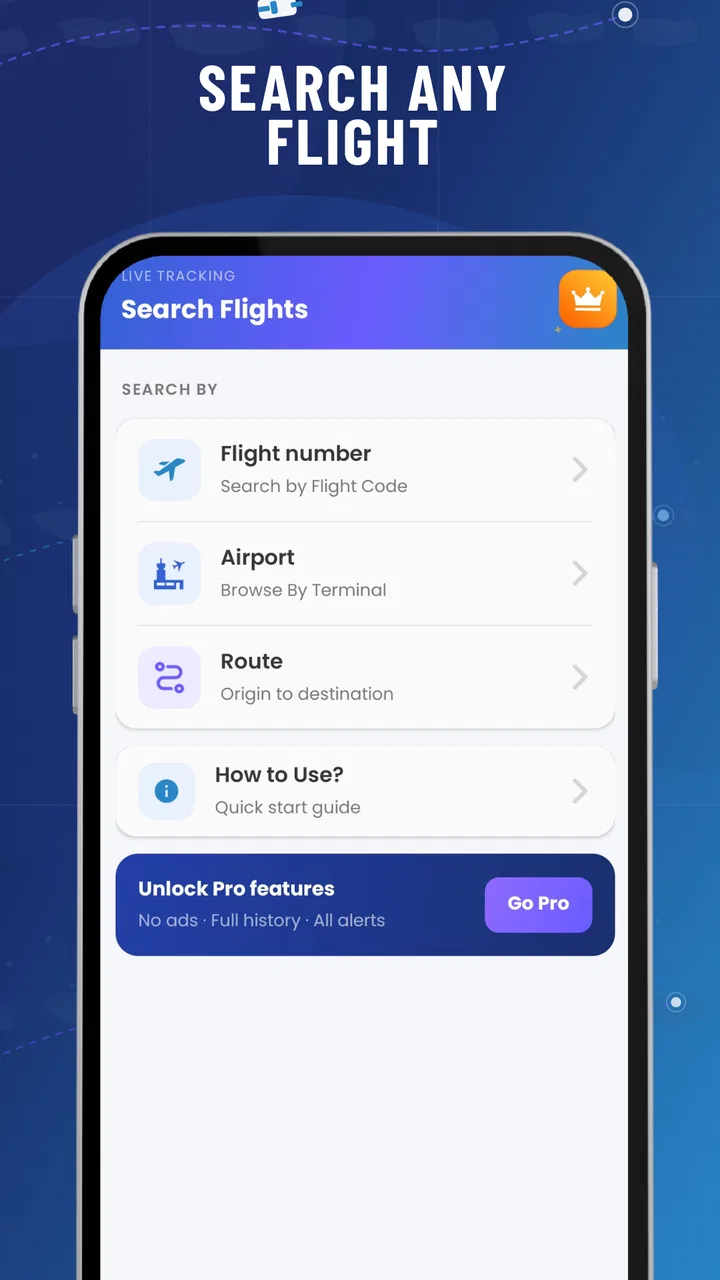
Flight Tracker: Live Radar is designed to help travelers monitor flights using an interactive map, flight-search tools, and status information. You can typically search by flight number, airport, route, or airline, then check details such as estimated departure and arrival times, delays, terminals, gates, and aircraft location when tracking data is available. It is useful for passengers, people meeting travelers, and aviation enthusiasts.
02How accurate and up to date is the flight information?
The app generally depends on data supplied by airlines, airports, air-traffic services, and third-party tracking providers. This means flight positions and schedules can be updated frequently, but they should not be treated as a guaranteed real-time source. Delays, gate changes, cancellations, and aircraft locations may appear after official updates. For important journeys, compare the information with the airline or airport’s official website and announcements.
03Can I track any flight worldwide, and what information is required?
Coverage depends on the flight route, airline, airport, and the data available in the app’s tracking network. In most cases, searching with the flight number and travel date gives the fastest result, although airport or route searches may also be supported. Some flights may show only scheduled information, while others provide a live map, aircraft details, departure and arrival estimates, and airport status.
04Does Flight Tracker: Live Radar require internet access or location permission?
An internet connection is normally required to load maps, retrieve current flight data, and refresh status updates. Location permission may be requested if you want the app to identify nearby airports, center the map around your position, or provide location-based suggestions. You can usually search manually without sharing your location, but disabling permissions may limit convenience features. Mobile data usage can increase when viewing live maps.
05Is Flight Tracker: Live Radar free to download, and are there in-app purchases?
The app may be available as a free download while offering optional premium features, subscriptions, or one-time purchases. Depending on the version and platform, paid options can include removing advertisements, unlocking advanced alerts, accessing extended flight history, or viewing additional tracking details. Check the app-store listing before installing for current pricing, trial conditions, renewal terms, and the exact features included in each plan.
Pros
- Real-time flight status updates help track delays
- gates
- and schedule changes.
- Interactive radar map makes it easy to follow aircraft and nearby airport activity.
- Flight search supports routes
- flight numbers
- airports
- and airline details.
- Useful arrival and departure information is presented in a clear
- accessible layout.
- Push notifications can keep travelers informed without repeatedly checking the app.
Cons
- Some advanced tracking features may require a paid subscription.
- Radar data can occasionally lag or differ from official airline updates.
- Advertising may make the free version feel less streamlined.
- Coverage and information quality can vary between airports and regions.
- The app may consume noticeable battery and mobile data during live tracking.

Flight Tracker: Live Radar
Gallery